

Curious about WordPress Maintenance? Don’t worry, today I am giving you a 6-Step Monthly Checklist. It’s a fact that WordPress is a rising force in the digital industry. It has a whopping user-base of 43.2% of the internet.
If you’re looking to build a WordPress website, then you should definitely consider WordPress. But here’s the problem with owning a WordPress website, or any website in general:
It’s like owning a house. You have to keep it maintained on a regular basis.
Speaking purely of WordPress, if you don’t keep it maintained, then you’re going to face performance issues galore. Slow-loading speeds, plugin / theme issues, accumulated junk, and the dangers of getting your WordPress hacked just scratch the surface of this problematic iceberg.
I’ve written this guide to get you started with WordPress maintenance on the right track. Once you’ve read this six-step listicle, you’ll be well on your way to maintaining your WordPress site.

Without further ado, let’s begin with the very first step, shall we?
Here’s a 6-Step Monthly Wordpress Maintenance Checklist
Step 1: Perform a Performance Check of your WordPress Website
GTMetrix and Google PageSpeedInsights are your best friends in that regard. It literally takes a few seconds to check the performance of your website, and it’s highly recommended that you do. You see, Google and other search engines give preference to a site that loads faster. These performance checks are aimed at checking the load speeds of your website.
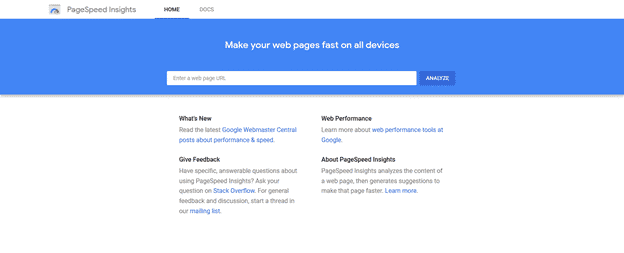
If there are any performance issues with regards to your website, try fixing them or hire a WordPress developer to fix them for you. When you have a high-performance website, you can rank better on Google.
Step 2: Get Rid of Junk Files
If you’ve been working on your WordPress site for a while now, chances are, lots of junk has accumulated in the backend.

By junk I mean useless data from old plugins / themes, post revision files, comment spam, and other unused data and settings. There is a WordPress plugin available aimed at solving each of these problems. They’re a Google search away!
Note: This process is a bit technical, but if you’re getting rid of junk files from the front-end, also check the backend database for trash files that might have accumulated.
Step 3: Check Your Plugins and Themes for Updates
As a WordPress user, you won’t be stranger to the benefits provided by plugins and themes. They add that necessary functionality and design to your site that otherwise wouldn’t have been present.
But here’s the thing: these WordPress themes are built by open-source developers. To keep their products secure, and to add new features, these developers regularly roll out new updates. To keep your site maintained, you need to update to the latest version.

Now, WordPress is relatively secure at its core but if left unchecked these themes and plugins can cause serious damage. If you don’t update your themes and plugins to the latest version, then you’re going to be facing a variety of problems.
So, update your WordPress themes and plugins. In addition to that, you should delete any unused plugins or themes to ensure that no plugin is taking up unnecessary space.
Step 4: Keep Your Website Backed-Up
What would you do if your WordPress site gets hacked? To many WordPress webmasters, such a thought rarely occurs. As discussed before, WordPress is secure from the outset, but you should be prepared for any eventuality.
WordPress websites are quite dynamic nowadays. With so many website elements changing quickly, having no backups is a recipe for disaster. Because of all this, it’s important that you keep your website backed up.

But how would you that? The simple solution is to use a WordPress backup plugin. There are plenty of them available for that purpose. If you’re looking to avoid any extra plugins, then you can download your WordPress website and then upload to a cloud software like Google Drive.
Lastly, it’s better to be safe than sorry. In the event your website gets compromised for one reason or another, then you will always have a backup present from which to restore from. Make sure that you do this when you do WordPress Maintenance.
Step 5: Keep the Security of Your WordPress Top-Notch
If you want to keep your WordPress site up and running, you’ve got to keep it secure. WordPress security is an important factor that’s been discussed time and time again.
To avoid any security problems, you need to stay vigilant and monitor your website’s health. Now, you don’t have to look for bugs and vulnerabilities by yourself. You can automate the process by using a security plugin like WordFence and Sucuri.
At an individual level, here are some considerations for your WordPress website:
Run regular security scans of your website with the plugins I’ve mentioned above. If there are particular errors with your WordPress, you should resolve them. In addition to that, you should also create strong passwords for your site.
Note: While it’s a bit tedious, if you’re a bit too concerned for your website’s security, then you can add a two-factor authentication to your website.
If your site has a number of user accounts, then you should deactivate and delete them. Unused user accounts can cause security breaches, so be mindful of them. In addition to these, you should also keep a check of your admin accounts for any signs of inactivity.
Step 6: Keep your Cache Cleared
This WordPress maintenance step is an overlooked process that shouldn’t be so. Clearing your WordPress cache is an essential aspect of keeping it optimized and performing well. You might be asking what is a website cache?
Well, a cache is a temporary storage for website documents within the browser. All the data, from web page cache, images, and web videos, are all stored within the browser to reduce server load and make a particular webpage load faster.
Now, they are quite beneficial but overtime they accumulate, and ultimately increase the server load on a website. It’s doing the exact opposite of it’s intended website. This causes performance issues within a website.
There are plenty of cache tools available on WordPress that let you clear cache automatically. Make it a regular habit to clear the cache of your website.
Conclusion
In this post, I’ve outlined the six-steps you can take to keep your WordPress website maintained. With these in consideration, you can improve the speeds of your WordPress website significantly and put you well on your way towards maintaining it.
If you have any other WordPress Maintenance tips, feel free to share them in the comment section below.
Watch this space for updates in the Hacks category on Running Wolf’s Rant.
🐺 Support Us: Buy us a coffee, it will help us to bring you more content.
📬 Become part of the Wolf Pack: Subscribe to our newsletter to stay in the loop.
🔍 Explore our site: Scroll down to see related and featured posts. You're also welcome to check out our Music, Screen or Knowledge Hubs. Alternatively, feel free to check out our Popular Articles.
📐 Afrikaanse Mense: Check bietjie ons Afrikaanse Hoekie uit.
🕳️ Go Down The Rabbit Hole: Read Random Facts or Watch a Random Music Video.
📅 Find Something To Do: Check out our Featured Upcoming Events or our SA Gig Guide.










Featured Articles




Looking for a gift for that special person in your life? Check out Netflorist.co.za, South Africa's top online florist and gift service. They offer flowers, gifts, and hampers for all occasions AND reliable nationwide delivery.
